Categorise your spending with Python + ChatGPT


I love Monzo categories. Categories are incredibly useful for analysing your spending.
Maybe I'm getting old, but I increasingly find myself:
- ordering takeaways
- going to the shops with a list and coming back with 12 items I don't need
- forgetting to cancel free trials
Curiously enough, I have seen an increase in my credit card bill and a corresponding decrease in my monthly savings.
Eager to understand these spending patterns in detail, I set out to map all of my historic credit card transactions to Monzo categories. By doing this groundwork, I could then:
- analyse historic spend and figure out what a typical month looks like
- merge these mapped transactions with my Monzo statements to give a complete history of categorised expenditure
- identify problem areas and set budgets as remedial action.
Unfortunately, I bank with Halifax. What's worse, credit card statements are only available in PDF format - rendering them useless for spend analysis.
I embarked on a quest to right this wrong, and wrote this code so you too can extract insights from your paper statements.
In this blog, I'll walk you through my approach to the problem, some features of the codebase and the challenges I faced along the way!
1. From Water into Wine
Industry experts estimate that 85% of the world's data is unstructured. But in analytics, structure lays the foundations for insight. Without it, spend analysis becomes a nightmare.
Unfortunately for me, PDFs and paper statements are quintessential examples of unstructured data.

From water into wine: turning unstructured information into structured tables
Oh well, I figured the 'Export to CSV' button in my online banking app would solve all my problems - such a feature would surely exist.
I figured wrong.
Undeterred from this set-back, I decided to create the structure myself.
First, I needed data. So I either scanned old paper statements or downloaded PDF versions from my banking app.
Next, I loaded this data into my development environment. Fortunately, in Python there are multiple packages you can use to read information from PDF files. PyPDF was my weapon of choice.
Bank statements are auto-generated and therefore predictable. Once the data is read in, text in the PDF can be parsed using REGEX to extract only the juicy goodness and discard the rest - like pomace from a grape.
# Extract text from page
text = page.extract_text()
# Exclude irrelevant text
match = re.search(r'BALANCE FROM PREVIOUS STATEMENT([\s\S]*?)Customer Services:', text)
extracted_text = match.group(1) if match else None
# Each transactions starts with the date
pattern = r'(\d{2}\s(?:JANUARY|FEBRUARY|MARCH|APRIL|MAY|JUNE|JULY|AUGUST|SEPTEMBER|OCTOBER|NOVEMBER|DECEMBER))'
# Each transaction is on a new line
records = [t.strip() for t in extracted_text.split('\n') if re.findall(pattern,t)]
2. This Wine is Corked!
As with any procedural operation, mistakes creep in when you're not looking. It's important to build in data quality checks to remove any impurities before they spoil your whole batch.
During my processing, impurities took the form of outlandish transaction dates.
Bank statements are typically issued monthly. Any transactions recorded therein must have happened in that time period. If they don't, alarm bells should be ringing.
Once our process has ingested the PDF text, we can remove any erroneously parsed dates by building a function specifically designed for the purpose.
def is_same_or_previous_month(parsed_date, file_date_obj):
    # Check if the parsed_date is the same or one month before the file_date
    if parsed_date.month == file_date_obj.month and parsed_date.year == file_date_obj.year:
        return True
    elif parsed_date.month == (file_date_obj.month - 1) and parsed_date.year == file_date_obj.year:
        return True
    elif file_date_obj.month == 1:
        parsed_date.month == file_date_obj.month or parsed_date.month == 12
        return True
    else:
        raise ValueError(f"The parsed_date {parsed_date} is neither the same month nor the previous month as the file date {file_date_string}.")
Another 'Gotcha' moment hit me when processing January bank statements. Transaction dates in Halifax statements don't include the year, so this is derived from the statement filename.
However, as each statement also contains days from the previous month, you get a situation where December transactions get attributed to the current year (i.e. a future date), instead of the previous one. To handle this scenario, a separate validity check is required:
def is_valid_transaction_date(date: str, file_date: str):
    parsed_date = pd.to_datetime(date, format="%d %B %y")

    file_date_obj = datetime.strptime(file_date, "%b-%y")
    file_date_obj = file_date_obj.replace(day=monthrange(file_date_obj.year, file_date_obj.month)[1])

    # Check date is not in the future
    assert parsed_date <= file_date_obj, f"{file_date}: date extracted is in the future: {date}"

    # Check year is valid
    if file_date_obj.month == 1 and parsed_date.month == 12:
        assert parsed_date.year == file_date_obj.year - 1, f"File year {file_date_obj.year} does not match year parsed {parsed_date.year}"
    else:
        assert parsed_date.year == file_date_obj.year, f"File year {file_date_obj.year} does not match year parsed {parsed_date.year}"

    # Check month is valid
    assert is_same_or_previous_month(parsed_date, file_date), f"File month {file_date_obj.month} does not match month parsed {date.split(' ')[1]}"
Just as a corked bottle ruins a fine wine, poor data quality will undermine even the most sophisticated data engineering process. Designing context-aware data quality checks are the difference between premium and poor.
3. ChatGPT as a Classifier
Huzzah! PDF text is now accurately structured as a neat table of transactions. All that's missing are the Monzo categories. To derive them, we need to work backwards from the transaction description.
In Data Science, this is known as a classification problem. Typically, a machine learning model assigns each data point to a category using insights it has 'learned' from pre-categorized training data. To the despair of my Data Science friends, I didn't embark down the machine learning route - I just asked ChatGPT to do it for me.
To my credit however, I did this using the OpenAI API - meaning I could extract and categorise transactions in the click of a button. Unlike the ChatGPT console, you cannot attach files in the API. To get around this, I split my historic transaction data into chunks of text to avoid exceeding the rate limit. We then request the API to return the category mappings:
def query_chatGPT(prompt: str) -> str:
    """ Takes string prompt as ChatGPT query, returns string response """
    completion = openai.ChatCompletion.create(
    model="gpt-3.5-turbo",
    messages=[{"role":"user", "content":prompt}]
    )
    response = completion.choices[0].message.content
    return response
To compile the complete set of transaction mappings, we need to send multiple requests to the API and parse the responses retrieved. ChatGPT loves a preamble, so we also need to discard any irrelevant text and extract only the dictionary of transactions mapped:
def extract_dict_from_chatGPT_response(response: str) -> dict:
    """ Searches ChatGPT's string response for text within curly brackets
        Returns all key:value pairs found as a dictionary
    """
    # Captures all text within curly brackets (aka the dictionary returned)
    pattern = r'{(.*?)}'

    # Captures only the key and value within dictionary
    str_pattern = r"'([^']+)':\s+'([^']+)'"

    # Find all matches in the extracted text
    matches = re.findall(pattern, response, re.DOTALL)

    dictionary={}
    for match in matches:
        # Find all matches in the string
        str_matches = re.findall(str_pattern, match)

        # Iterate through the matches and store them in the dictionary
        for str_match in str_matches:
            key = str_match[0]
            value = str_match[1]
            dictionary[key] = value

return dictionaryFor the most part, I found that ChatGPT was a reliable classifier. For example, the description 'Nandos' would be mapped to Eating Out, whilst 'Uber' would correspond to Transport. But for cryptically worded transactions, it would have a hard time. If doing this yourself, I strongly advocate that you thoroughly review the mappings returned, as you can easily modify questionable classifications in the output JSON. Generative AI is no golden bullet - as the old adage goes: "garbage in, garbage out"!
4. Putting it together
We now have two separate outputs:
- a neat data table of historic transactions
- a map of transaction descriptions to Monzo categories
All we need to do is to add the Monzo categories to our data table, using the map of transaction descriptions as our common field.
def merge_mapping_with_transactions(credit_card_category_mappings: dict, df: pd.DataFrame):
    # Ensure transaction descriptions (keys) are uppercase for dataframe merge
    transaction_categories = {k.upper():v for k,v in credit_card_category_mappings.items()}
    # Convert to dictionary to dataframe
    categories_df = pd.DataFrame(data=transaction_categories.items(),columns=["Transaction Description","Category"],index=range(len(transaction_categories)))
    # Merge category mappings with all transaction records
    credit_card_df = pd.merge(df, categories_df, on='Transaction Description', how='left')
    return final_df
The result? A neat data table which can be merged with the CSV exports from my Monzo statements - giving a full history of categorised expenditure!
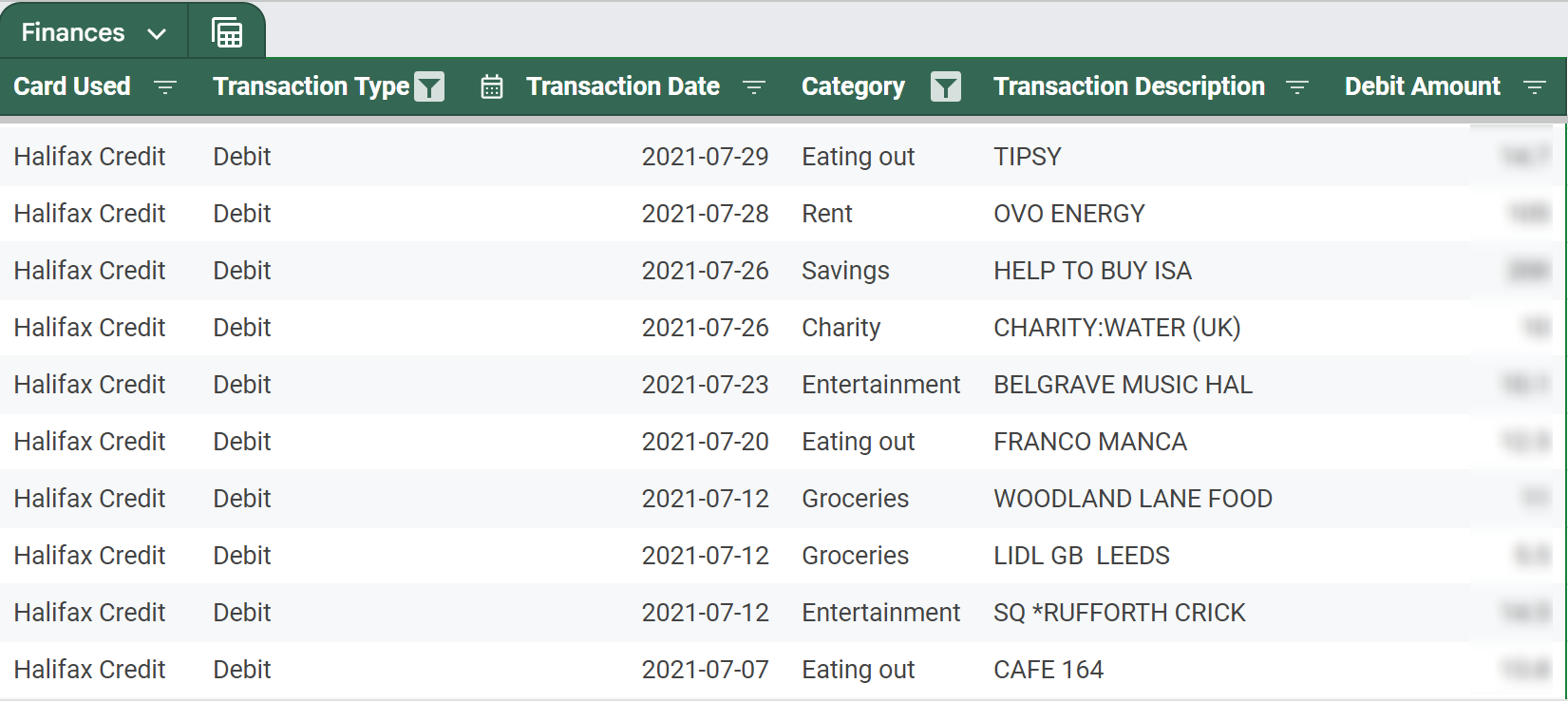
The fruits of my labour: PDF bank statements have been structured and mapped to Monzo categories!
5. What's next?
In this blog, we've traversed the tricky terrain of unstructured data, battled with PDF parsing, spurious transaction records, and harnessed generative AI to categorize our spending. With this framework, we've laid the foundations for smarter financial decision-making. So, where do we go from here?
With some simple analysis, I have now tracked trends and set realistic monthly budgets for each spending category. Don't get me wrong, I'm definitely still partial to an Old El Paso Fajita Kit impulse buy, but monitoring helps me keep this behaviour in check.
Undergoing this journey has been rewarding - but it’s only the beginning. Whether it's optimising the classification engine via machine learning or building a custom financial dashboard - I can't say for sure. What I can say is that this journey has sparked a passion for finding creative solutions to the gripes of everyday life. There's so much more to explore, and I’m excited to see where it leads next. Stay tuned for more!